By Ali Abbas Khan, Director of Buyer Area Ltd. We have been testing, refurbishing and selling business laptops in the UK since 2011. Last updated 23 October 2026.
Quick answer
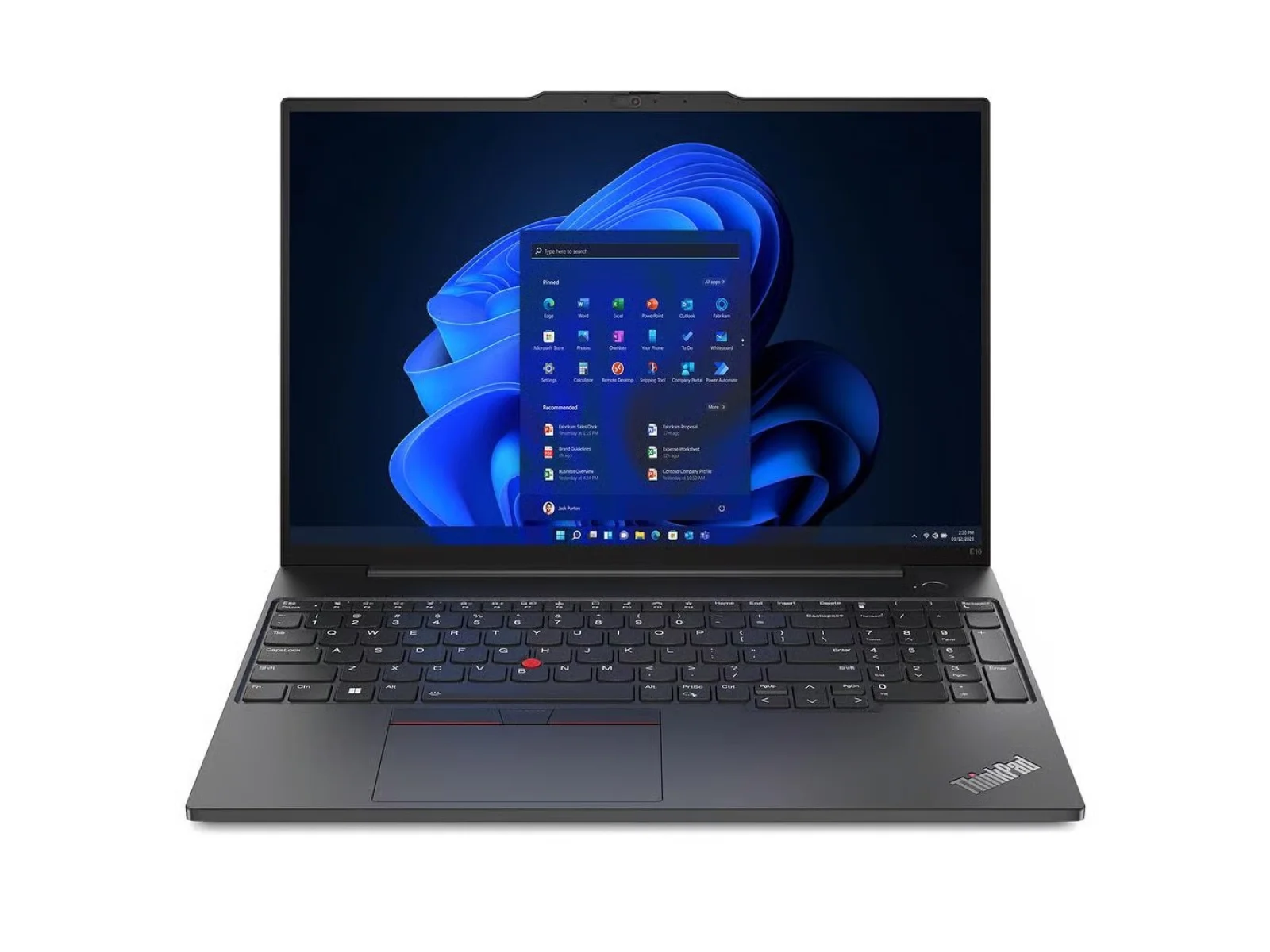
Yes. A refurbished ThinkPad E16 Gen 1 is one of the best-value 16-inch business laptops you can buy in 2026, as long as you want a big screen, a full keyboard with a number pad and all-day office performance, and you don't need a light travel laptop or a colour-accurate screen for photo work.
- Best for: office work, spreadsheets, accounting, remote working, students, small business fleets.
- Not ideal for: frequent travel (it weighs about 1.8 kg), gaming, or professional photo and video editing.
- Price: from around £499 refurbished at Buyer Area (October 2026), against roughly double that for a new 16-inch ThinkPad.
- Our pick: the Ryzen 7 7730U version if you multitask heavily; the Ryzen 5 7530U if you mainly use email, Office and the web.
See our refurbished ThinkPad E16 Gen 1 stock and prices
ThinkPad E16 Gen 1 at a glance
The ThinkPad E16 Gen 1 launched in 2023 as Lenovo's 16-inch mainstream business laptop. It sits below the premium ThinkPad T16 and X1 ranges, but keeps the things ThinkPad users care about: a strong keyboard, a TrackPoint option, easy servicing and business security features.
| Specification | ThinkPad E16 Gen 1 (AMD) |
|---|---|
| Processor | AMD Ryzen 5 7530U (6 cores / 12 threads, up to 4.5 GHz) or Ryzen 7 7730U (8 cores / 16 threads, up to 4.5 GHz) |
| Graphics | AMD Radeon integrated |
| Memory | DDR4-3200, 8 GB soldered + 1 SO-DIMM slot, up to 40 GB |
| Storage | Two M.2 SSD slots (2280 and 2242) |
| Display | 16-inch 16:10; most units 1920 × 1200 IPS anti-glare; some 2560 × 1600 IPS |
| Ports | 2 × USB-A 5 Gbps, 1 × USB-C 5 Gbps, 1 × USB-C 10 Gbps (both USB-C with charging and DisplayPort), HDMI 1.4b, Gigabit Ethernet, 3.5 mm audio |
| Wireless | Wi-Fi 6 or 6E, Bluetooth |
| Keyboard | Full size with numeric keypad, optional backlight, TrackPoint on many units |
| Webcam | 1080p with privacy shutter (IR for Windows Hello on some units) |
| Size and weight | 356.1 × 247.7 × 19.85 mm, from about 1.77 kg |
| Charging | 65 W USB-C |
| Machine types | AMD: 21JT, 21JU · Intel: 21JN, 21JQ |
Sources: Lenovo PSREF specification sheet; independent reviews by Notebookcheck, ITPro and TechRadar (listed at the end).
Tip: the machine type on the label underneath the laptop (for example 21JT or 21JU) tells you whether it's the AMD or Intel version. We list the exact processor, RAM and SSD on every unit we sell.
Performance: Ryzen 5 7530U vs Ryzen 7 7730U
Both chips use AMD's efficient Zen 3 cores, so the laptop stays quick and quiet for everyday work, and performance holds up well on battery.
| Ryzen 5 7530U | Ryzen 7 7730U | |
|---|---|---|
| Cores / threads | 6 / 12 | 8 / 16 |
| Max boost | 4.5 GHz | 4.5 GHz |
| Feels best for | Email, Office, Teams, web, light photo edits | Heavy multitasking, big spreadsheets, many browser tabs, virtual meetings while working |
Which should you choose? If you keep 10+ browser tabs, Excel and Teams open together, the Ryzen 7 7730U is worth the extra. For typical office or study use, the Ryzen 5 7530U with 16 GB RAM is the value sweet spot.
Notebookcheck measured the Ryzen 7 7730U at about 10,300 points in Cinebench R23 multi-core, which is comfortably enough for office and business software. The integrated Radeon graphics handle multiple monitors and video calls, but this isn't a gaming laptop.
Display: what to expect
The E16 Gen 1's 16-inch, 16:10 screen gives you noticeably more vertical space than a 15.6-inch 16:9 laptop, which helps with spreadsheets and documents.
- 1920 × 1200 (most common): matte and anti-glare, around 300–350 nits in reviews, so it's fine indoors and usable near a window. Colour coverage is limited (about 55% sRGB), so it's not for photo editing.
- 2560 × 1600 (less common): brighter (Notebookcheck measured about 410 nits) and much more colourful (about 95% sRGB). If you see one, it's worth the upgrade.
Our take: for office work, the standard panel is perfectly fine. For colour-critical work, plug in an external monitor using the HDMI or USB-C ports.
Battery life: how long does it last?
E16 Gen 1 units came with a 47 Wh or 57 Wh battery. Independent tests vary a lot depending on the test:
- ITPro: about 14 hours in a video playback test (57 Wh battery).
- TechRadar: about 7 hours in mixed real-world use.
Realistic expectation: a full working day of office use with sensible brightness. Each listing states the unit's grade, and where the battery has been tested, its battery standard.
Upgrades: the E16 Gen 1's hidden strength
This is where the E16 Gen 1 beats many newer, thinner laptops:
- RAM: 8 GB is soldered, plus one SO-DIMM slot. Add a 32 GB stick for up to 40 GB of DDR4-3200.
- Storage: two M.2 SSD slots, so you can add a second SSD without removing the first.
- Wi-Fi card: replaceable.
- Easy access: the bottom cover is held by standard screws and clips.
That makes it a great long-term buy: you can start with 16 GB and upgrade later for very little money.
Keyboard, build and security
- Keyboard: full size with a numeric keypad, comfortable 1.5 mm travel, and separate arrow and Page Up/Down keys. Reviewers consistently rate it one of the best keyboards at this price.
- Build: aluminium lid with a plastic base, and it feels solid. At about 1.8 kg it's best for desk and home-office use rather than daily commuting.
- Security: fingerprint reader on many units, webcam privacy shutter, TPM 2.0, and an IR camera for Windows Hello on some units.
- Windows 11: the Ryzen 7030-series processors are supported by Windows 11, so it's ready for current Windows updates.
ThinkPad E16 Gen 1 vs ThinkPad T16: which should you buy?
| ThinkPad E16 Gen 1 | ThinkPad T16 (Gen 1/Gen 2) | |
|---|---|---|
| Position | Mainstream business | Premium business |
| Price refurbished | Lower | Higher |
| Keyboard | Excellent, with numpad | Excellent, with numpad |
| Upgrades | 1 RAM slot, 2 × M.2 | Varies by generation |
| Weight | About 1.8 kg | Slightly lighter |
| Best for | Best value per pound | Fleet buyers wanting premium build |
Verdict: if you want the best value for money and a big screen for desk work, the E16 Gen 1 gives you most of the T16 experience for less.
Pros and cons
Pros
- Big 16-inch 16:10 screen with a full number pad
- Excellent ThinkPad keyboard
- Upgradeable RAM (up to 40 GB) and two SSD slots
- Strong everyday performance from Ryzen 5 / Ryzen 7
- Ethernet, HDMI and two USB-C ports with charging
- Windows 11 supported
Cons
- About 1.8 kg, so not ideal for frequent travel
- Standard 1920 × 1200 screen has limited colour range
- No SD card reader or Thunderbolt/USB4
- Integrated graphics only
Who should buy a refurbished ThinkPad E16 Gen 1?
- Small businesses kitting out staff with a reliable, serviceable laptop
- Accountants, admin and finance teams who live in spreadsheets and need a numpad
- Students who want a big screen and a keyboard that lasts
- Home workers replacing an older 15.6-inch laptop
Why buy it refurbished from Buyer Area?
- 12-month warranty on every laptop
- Tested and professionally refurbished in our own UK facility
- Clear grading (Grade A or B). Each listing states the unit's grade, and where the battery has been tested, its battery standard.
- Free UK delivery (2–4 working days)
- 30-day returns with a full refund
- UK business trading since 2011, ISO 9001, 14001 and 45001 certified
Shop refurbished ThinkPad E16 Gen 1 laptops · See all refurbished ThinkPads
Frequently asked questions
Is the ThinkPad E16 Gen 1 a good laptop?
Yes. It's a reliable 16-inch business laptop with an excellent keyboard, a numpad, strong Ryzen performance and easy upgrades. Its main weaknesses are its weight (about 1.8 kg) and the basic colour range of the standard screen.
How much RAM can the ThinkPad E16 Gen 1 take?
Up to 40 GB: 8 GB is soldered to the board, and there is one SO-DIMM slot that takes up to a 32 GB DDR4-3200 module.
Does the ThinkPad E16 Gen 1 have two SSD slots?
Yes. It has two M.2 slots (2280 and 2242), so you can add a second SSD.
What is the battery life of the ThinkPad E16 Gen 1?
It depends on the battery (47 Wh or 57 Wh) and your use. Reviews range from about 7 hours of mixed use to about 14 hours of video playback. Expect a full working day of office use.
Does the ThinkPad E16 Gen 1 have a backlit keyboard?
Many units do (a two-stage white backlight), but it was an option. Check the listing for the unit you're buying.
Can the ThinkPad E16 Gen 1 run Windows 11?
Yes. The AMD Ryzen 7030-series and Intel 13th Gen processors used in the E16 Gen 1 are supported by Windows 11.
Does the ThinkPad E16 Gen 1 charge over USB-C?
Yes. Both USB-C ports support charging (65 W) and DisplayPort output to an external monitor.
Is the ThinkPad E16 Gen 1 good for students?
Yes, if it will mostly live on a desk. The big screen, numpad and keyboard are great for study and coursework. If you carry a laptop all day, a 14-inch model is lighter.
What's the difference between the 21JT/21JU and 21JN/21JQ models?
21JT and 21JU are the AMD Ryzen versions; 21JN and 21JQ are the Intel 13th Gen versions.
Is it worth buying a refurbished ThinkPad E16 Gen 1 in 2026?
For most office, study and small-business users, yes. You get a modern, Windows 11-ready 16-inch ThinkPad for about half the price of a new equivalent, with a 12-month warranty when you buy from Buyer Area.
Sources
- Lenovo PSREF: ThinkPad E16 Gen 1 (AMD) specifications
- Notebookcheck: Lenovo ThinkPad E16 G1 AMD review
- ITPro: Lenovo ThinkPad E16 review
- TechRadar: Lenovo ThinkPad E16 Gen 1 review
Prices and stock correct at the time of writing (October 2026). See the product page for live prices.